Developing the shootis the slow part.
Kelvin reads a photograph — the scene, the light, what has technically gone wrong — and builds four complete edits from what it finds. Pick the one closest to what you had in mind and carry it across the rest of the folder.
It all runs on your Mac. There is no account, and your photographs are never uploaded.
5.4 MB · macOS 14+ · Apple Silicon · free, AGPL-3.0-only
New in 0.9.2: Skies and firelit faces come through, and a look carries your finishing touches
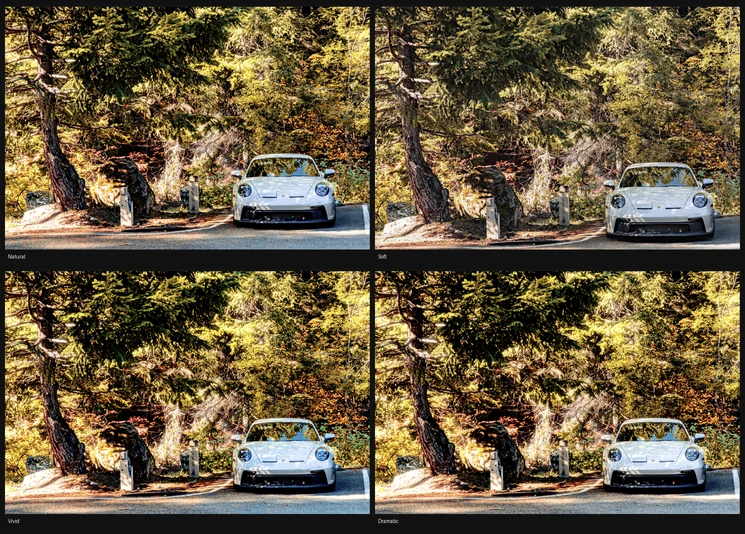
Kelvin’s words: True to the scene
Where the numbers actually come from
- Is there a subject?
- yes · no
- What kind?
- person · animal · object · landform
- Indoors?
- yes · no
- Any sky?
- yes · no
That is every answer it can get back. Apple’s Vision framework answers the first two, from a 768-pixel copy of the photograph. On a Mac with Apple Intelligence (macOS 27 and later), Apple’s on-device model answers the rest, and it can only pick from these words. There is nowhere in any answer to put a number.
- Temp
- 6,500 K, as shot
- Tint
- 0
- Exposure
- 0.00 EV
- Contrast
- +12
- Highlight recovery
- 0
- Whites
- +6
- Blacks
- −14
These come from ordinary code reading the histogram and the EXIF. Run it twice on the same file and you get the same numbers — they are arithmetic, not a guess, and arithmetic can be checked.
Ask a model for an exposure and it will give you one — exposure: +0.37, delivered with the same confidence whether it is right or wrong, and afterwards no way to tell which it was. So Kelvin never asks for a number. It asks only what a detector can genuinely answer — is there a subject, and is it a person, an animal or a sea stack — and the exposure is then calculated from the histogram, the way any other photo software would calculate it. That question used to go to a two-billion-parameter model shipped inside the app. Measured against real before-and-after edits, Apple’s own Vision framework answered it better, in a tenth of a second, with nothing to download. The answers decide what gets touched, not by how much: if the model says there is no sky, there is no sky edit, which is how living rooms stopped getting sky masks.
The same rule holds for what is wrong with a photograph. Kelvin does not take any model’s word that the shadows are crushed or the sky is blown; it measures the histogram and finds out. When those two were checked against each other over seventy-seven real edits, they were not describing the same photographs — so the engine stopped asking. Fewer photographs come out worse than if it had done nothing at all.
The four candidates are survivors, not the whole field. The engine renders more styles than it shows, scores each against its own craft checks, and drops any with a real defect — a Dramatic that crushes a backlit frame into silhouette never reaches the menu.
Big enough to actually choose between
A professional can read +18 contrast off a list and picture the result. Everyone else needs to see it. So press C and the candidates take over the window — two side by side, or all four when you want the survey.
Two up is the default, because a comparison is a question, and this one or that one is a question anybody can answer. Zoom and pan apply to every tile at once, so you are never comparing two different parts of the frame, and what you are looking at is a real render rather than an enlarged thumbnail — a comparison of anything other than what you would actually get is worse than no comparison.
Each look also says what it does in plain words, worked out from its own numbers: “more contrast, deeper blacks, with a deeper sky”, or “true to the scene, with the person brighter”. The numbers are still there when you hover.
Edit one part of the frame
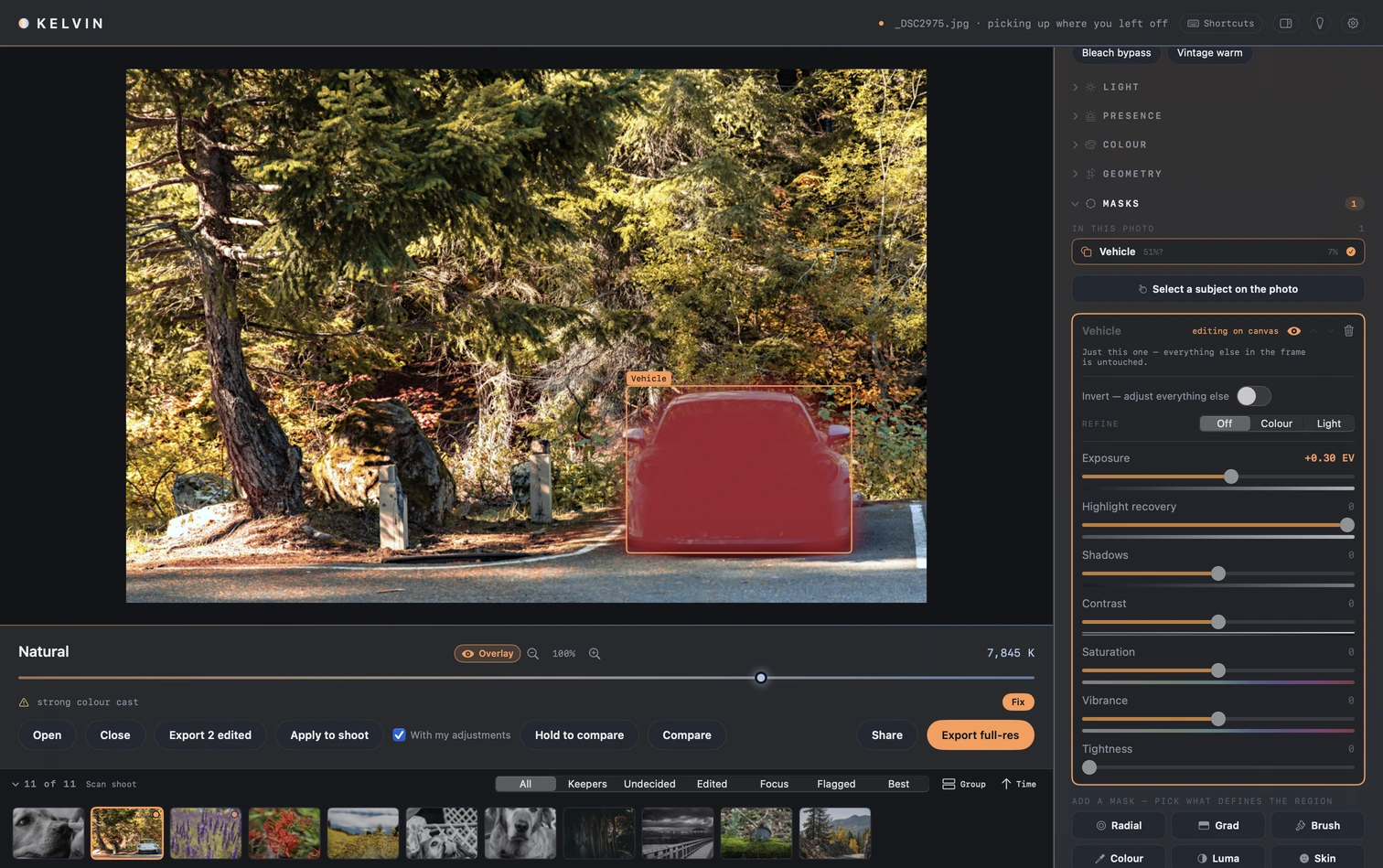
A mask limits an edit to one part of the frame. Kelvin can find a subject, the sky, skin or the background for you; above, a mask on the car lifts it by a third of a stop and leaves the forest alone. Invert it and the edit swaps sides. A mask can be narrowed by colour or by light.
Detection finds whatever stands out most and then stops, so it will not find the one tree you wanted darker. So you can point at the thing you want instead, and the selection spreads from there until the picture stops matching. What gets stored is that point and a tolerance, never a bitmap, so the selection you approve on screen is the one that reaches a full-size export.
The wand’s weakness is colour: where the thing you pointed at touches something else the same colour, the selection walks straight into it. On macOS 27 there is also Object, which uses Apple’s object selection instead. Click the dog and it takes the whole dog; ⌥-click takes off a piece you didn’t want. It is stored as your clicks, like the wand, so the export rebuilds the same selection. For anything either one gets wrong, the brush adds and erases by hand.
None of this is generative. There is no inpainting, no object removal and no sky replacement, and none of it is planned. Kelvin changes how a frame is developed, not what was in front of the lens.
The one exception is small and worth stating plainly: click a speck of sensor dust and Kelvin patches it, choosing a clean piece of the same photograph to cover it with. Nothing is invented and nothing is fetched — it is a few pixels moved a short distance, stored as a position rather than as pixels, so one click travels to the rest of the shoot and to the full-size export.
Applying it to the rest of the folder
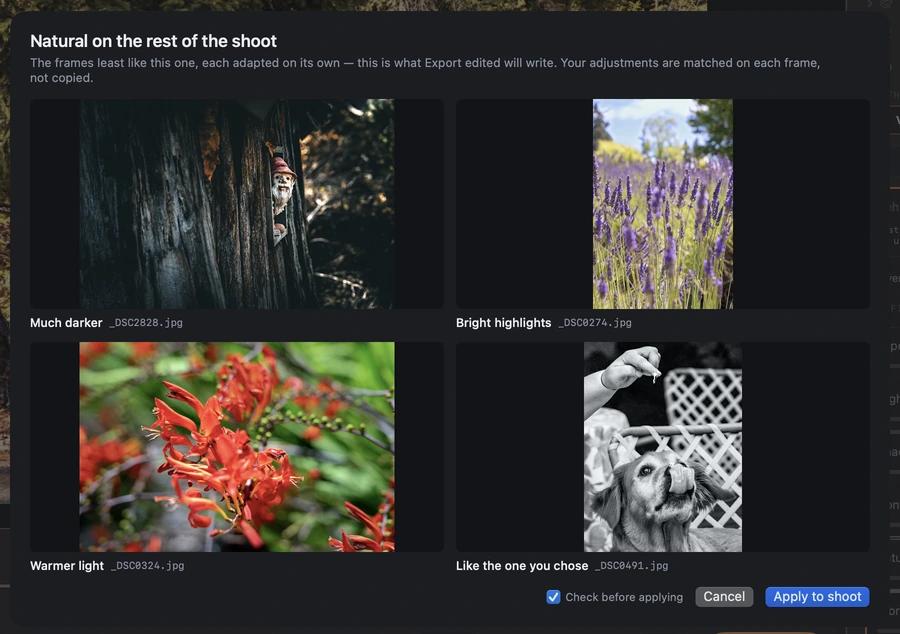
Settle on a look for one frame and Apply carries it across the others, including anything you did by hand afterwards. That part travels as the change you made rather than as slider positions: if you made the photograph a little brighter, every other frame gets a little brighter from where it started, so one that was already bright does not blow out.
On a shoot of more than eight, Apply first shows the look on the four frames least like the one you chose it on, such as the darkest, the brightest and the ones in odd light. It says why each was picked and warns you if the look doesn’t suit one. Cancel changes nothing.
The filmstrip groups the folder into the days the photographs were taken, and a frame with a strong colour cast says so, with a Fix button next to the warning.
Watch it work
Silent · 18 seconds · 1512×950
It works with the Wi-Fi off
The scene is read by Apple’s Vision framework, which is part of macOS, so the reading happens on your Mac and there is no upload step to wait for. If your library lives in iCloud it still lives in iCloud — Kelvin changes nothing about that, in either direction.
No account, no upload, no telemetry
There is no crash reporting either. The app does make two kinds of request, an update check and place-name lookups for geotagged photos, and the privacy page says exactly what each one sends.
No server on the other end
The scene is read on the Mac itself, not behind an API, so reading a photograph needs no network. Where Apple's on-device model is used, it is the one on your Mac, never Apple's cloud model.
Your originals are never written to
Edits are kept in Kelvin's own folder as small JSON files, never beside your photos. The RAW your camera wrote is left byte for byte as it was.
Exports keep your metadata, including location
It is on by default, because quietly deleting something you might need later is the worse mistake. One switch in the export options removes it.
- Opens
- RAW · JPEG · HEIC · PNG · TIFF
- Exports
- JPEG · HEIC · PNG · 16-bit TIFF
- Colour spaces
- sRGB · Display P3 · Adobe RGB
- Export size
- Full, or a long edge you choose
- HDR
- RAW to HEIC keeps its highlight headroom
- Tests
- 1,119 — 787 core, 332 app
- CI
- Runs on every pull request
- Licence
- AGPL-3.0-only, with a CLA
- Requires
- macOS 14 or later · Apple Silicon
- Download
- 5.4 MB

Shipped. Not finished.
Kelvin 0.9.2 is real, and it is early. Everything above is the app running on real photographs from a Sony A7R IV, not a mockup. Download it, point it at a folder, and check this page against what happens. There will be rough edges, and the repository’s issue tracker is where they get fixed.
The source is public under AGPL-3.0-only — the repository is on GitHub, tests and licence and all. New releases land here and in the app’s own update check, which looks about once an hour and asks before it installs anything. A switch in Settings turns it off, and the privacy page says exactly what it sends.
Kelvin-0.9.2.dmg · 5.4 MB · macOS 14+ · Apple Silicon